Bands
What are Bands in PianoRhythm?
Bands are player groups that you can create and join in PianoRhythm. Each band has a short, unique tag (3–4 characters, like [SUN] or [JP42]) that members can choose to display next to their username, giving everyone a shared identity across the app.
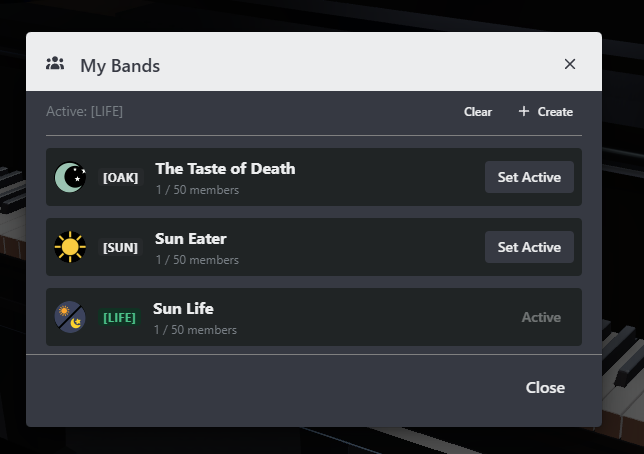
0.10.0This screenshot was taken in version: 0.10.0
The Bands modal
Open the Bands button in the instrument dock to launch the Bands modal. It has two tabs:
- My Bands — the bands you already belong to. Pick your active band, open a band to see its members, or jump into creating a new band.
- Bands — a searchable, paginated list of every band on the server. Use this tab to discover bands and send a request to join one you're not in.
Key concepts
- Roles — The user who creates a band is its Owner. Owners can promote any member to Admin, a role that sits below Owner and can recruit and remove regular members. Everyone else is a Member. Only the Owner can edit band details, manage the profile image, or change member roles.
- Band Tag — A globally unique 3–4 character alphanumeric label (uppercase only). It's the short identifier that prefixes a member's name when they set the band as active.
- Active Band — A per-user setting. Setting a band as your active band shows
[TAG] Usernameacross the app. You can clear it any time to hide the tag. - Limits — You can be in up to 3 bands at once. Each band can have up to 50 members.
Quick start
- Creating a Band — walk through the four-step create flow.
- Managing Members — browse and join bands, manage join requests, and use the members list.
- Your Active Band — show your band tag in rooms and chat.
- Band Profile Image — upload or change a band's avatar.
Coming soon
A few capabilities exist in the data model but aren't yet available in the UI:
- Editing a band's name, tag, description, or accent color after creation
- Band-only chat and other in-band social features
These may land in a future update.